There are many scenarios that require mapping an address or location to geographic coordinates (geocoding). For example, we had a need to do that in order to search Twitter using TwInbox. There are literally thousands of other cases that require latitude and longitude of a particular location.
There are websites out there that let you type an address and see the geocode for that address. However, they are usually limited in some way. For example, they only work within a particular country.
In this article we show you how to find geocode for any location, using Google Maps. All it takes is a few simple steps.
Step 1 – Find the location in Google Maps
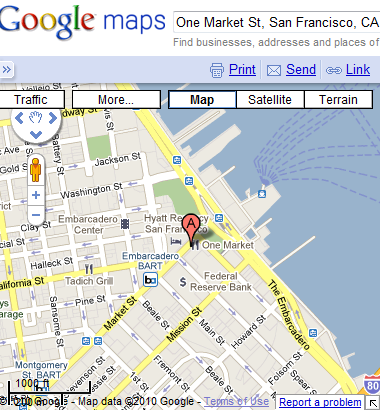
Start by looking up the address or location in Google Maps. In this example, we lookup “One Market St, San Francisco, CA”.
Step 2 – Click on the Link hyperlink
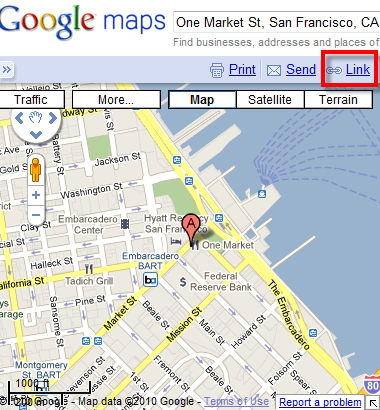
Click on the “Link” hyperlink in the upper-right corner of the map.
Step 3 – Click on Customize
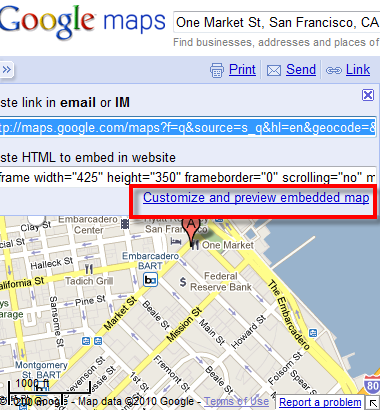
Click on “Customize and preview embedded map”.
Step 4 – Find latitude and longitude (geocode)
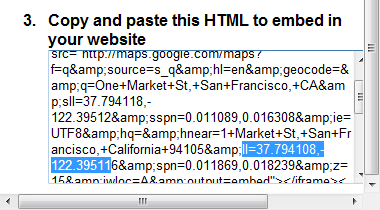
In the preview window, scroll down to section 3 (HTML embed code). Look for the fragment that starts with “ll=”. In our example, it is “37.794108,-122.39511” (See the screenshot below). That’s it. Pretty simple!
Note: be sure you are looking for “ll=” and not for “sll=”.
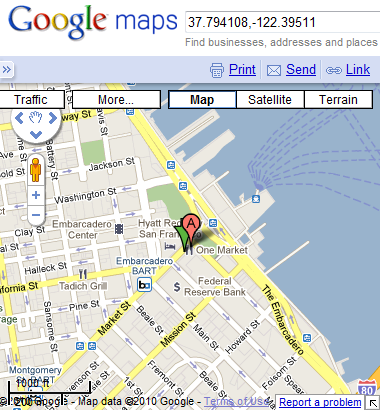
You can verify your result by entering the values back into Google Maps:
Did you this tip useful?
One Reply to “How to find latitude and longitude (geocode) for any address using Google Maps”
Comments are closed.