Tag Archive for 'TwInbox'

TwInbox 2.2.0.125 – Mandatory Upgrade

TwInbox LogoTwitter is planning several API changes in the next few days. Today we released TwInbox 2.2.0.225 which supports the API changes. Please upgrade ASAP to ensure continuous TwInbox operation.

Download the latest version of TwInbox from our website.

Be sure to follow @TechHit on Twitter to keep up to date with the latest news and updates. Thank you for using TwInbox!


Do you have too many messages in your Inbox? Try SimplyFile  – Intelligent filing assistant for Microsoft Outlook.


.

TwInbox 2.2.0.121 release

TwInbox LogoToday we released TwInbox 2.2.0.221.

New in this release:

  • Preview for t.co URLs. Now you can see where a link points to before clicking on it.
  • An option to enable/disable inline image preview in tweets. (Located on the Preferences tab of the Options window).

Note: Due to Twitter API limitations, the above features do not work for searches.

The latest version of TwInbox is available for download now from our website.

Be sure to follow @TechHit on Twitter to keep up to date with the latest news and updates. Thank you for using TwInbox!


Do you have too many messages in your Inbox? Try SimplyFile  – Intelligent filing assistant for Microsoft Outlook.


.

TwInbox 2.2.0.120 – Mandatory Upgrade

TwInbox LogoTwitter permission changes

Twitter has changed the way they handle authorization for 3rd party application. We have updated TwInbox to comply with the new requirements. The new version is available for download today from our website.

Upgrade is required to see direct messages

As the result of the above changes, the old versions of TwInbox will be unable to fetch your direct messages starting on June 30. In order to continue receiving direct messages in TWInbox, you must install the new version.

Re-login after the upgrade

After you have installed the new version, you will need to re-authorize your Twitter accounts in TwInbox. It is a simple process – just click the “Sign In to Twitter” button in the Account Options window, then enter your user name and password.


Be sure to follow @TechHit on Twitter to keep up to date with the latest news and updates. Thank you for using TwInbox!

TwInbox 2.1.0.116 release.

TwInbox LogoOn October 22nd, a subtle change in Twitter API broke TwInbox. We have released an update to fix this issue later that day. All users – please install the latest version of TwInbox from our website.

Be sure to follow @TechHit on Twitter to keep up to date with the latest news and updates. Thank you for using TwInbox!

TwInbox now supports OAuth authentication – upgrade today

TwInbox LogoAs many of you know, Twitter is changing the way they perform authentication for API calls. They are changing from using so called Basic Authentication to OAuth. The old authentication mechanism will be disabled on August 31st, 2010.

We have made the necessary changes in TwInbox. All you need to do is simply install the latest version and your TwInbox will keep running as smoothly as it did before. Remember, download and install the latest version by August 31, otherwise your copy of TwInbox will stop working.

Download TwInbox. (version 2.1.0.115)

Tell your friends to upgrade

Please tell you friends and coworkers who are using TwInbox to upgrade as well, so that they do not suffer from Twitter withdrawal on September 1st :)

Do not forget to follow @TechHit to receive update notifications.


 Do you have too many messages in your Inbox? Try SimplyFile  – Intelligent filing assistant for Microsoft Outlook.


.

TwInbox now supports sending new-style retweets (Version 2.0.1.112)

TwInbox LogoToday we released a new version of TwInbox – 2.0.1.112. This release includes one frequently requested new feature – an ability to send new-style retweets.


New-style retweet support

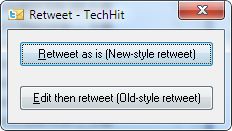
When you select a tweet and click the RT button, you will see a dialog which will let you select between the new-style and old-style retweet. It looks like this:

Select the type of retweet you want to send

Select the type of retweet

Next time you click RT, this window will remember your previous selection, so you can simply hit Enter.

Note that this retweet type selection window is only shown when you retweet tweet messages. If you hit the RT button when a regular message is selected, you will see the old-style retweet. This is because only tweets can be retweeted using the new-style RT.

Download TwInbox  (version 2.0.1.112).

We are looking forward to your feedback

As always, we are looking forward to hearing your feedback.  If you enjoy using TwInbox, please show your support by telling your friends about it. Thank you for your continued help and support in making TwInbox a success!

Do not forget to follow @TechHit to receive update notifications.


Do you have too many messages in your Inbox? Try SimplyFile  – Intelligent filing assistant for Microsoft Outlook.


TwInbox 2.0.1.111 release

TwInbox LogoToday we released a new version of TwInbox – 2.0.1.111. This release includes several small but important usability-enhancing features.


Selecting recipients and hash tags

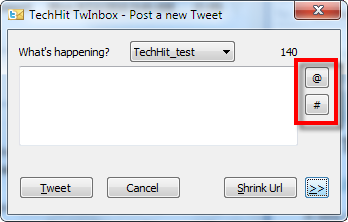
TwInbox will remember sender names and hash tags for all messages you receive. The “Post a new Tweet” window now has buttons for picking recipients and hashtags using convenient selection dialogs. 

Click "@" or "#" to insert @recipients or #hashtags

Click "@" or "#" to insert @recipients or #hashtags

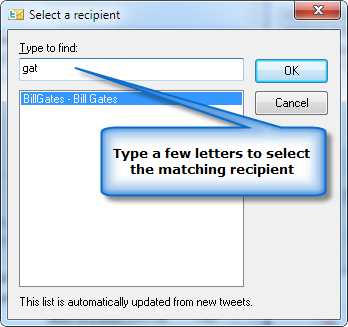
To select a recipient, click the “@” button. In the “Select a recipient” window, type a few characters of the person’s name to select it, then click OK.

Type a few letters to select a @recipient

Type a few letters to select a @recipient


Selecting hashtags works in a very similar fashion.

Note: In order for a tweeter user to appear in the selection window, you have to have received a tweet from them after installing this new version. The same applies to hashtags. 

Sorting retweets into recipient folders

This version also includes a small change to the way tweets are sorted into recipient-based sub-folders. (Applies only if you enable that option). Now tweets are stored in the folder for the person who retweeted it, instead of the folder for the person who sent the original tweet. This change is a result of feedback of many of you who said that you would prefer this behavior. It will only create folders for the senders you follow.

Download TwInbox 2.0.1.111

Download TwInbox 2.0.1.111.

We are looking forward to your feedback

As always, we are looking forward to hearing your feedback.  If you enjoy using TwInbox, please show your support by telling your friends about it. Thank you for your continued help and support in making TwInbox a success!

Do not forget to follow @TechHit to receive update notifications.


Do you have too many messages in your Inbox? Try SimplyFile  – Intelligent filing assistant for Microsoft Outlook.


Performing a location-based Twitter search in TwInbox

When you do a Twitter serach using the website, you can use the “near:” operator to find tweets related to a particular location. For example, here is how you can look for a happy hour near One Market Street in San Francisco.

Unfortunately, the “near:” operator is not supported by the Twitter search API. So when you perform a search from TwInbox, or another Twitter client, you cannot use it. However, all is not lost. There is a relatively simple workaround. You can find coordinates of (geocode) the location you are looking for, and then use the “geocode:” search operator.

Step 1 – Geocode the location

Geocoding a location is very simple. Here is an article that shows how to find latitude and longitude of a location using Google Maps. Using that method you can determine that coordinates of One Market Street in San Francisco are 37.794108,-122.39511.

Step 2 – Configure a search

Using the coordinates, you can perform the search. For example, you can use Twitter website search.

Or you can configure a search in TwInbox:

TwInbox location-based search using geocode

TwInbox location-based search using geocode


Did you find this tip useful?

TwInbox 2.0.0.109 release supports Favorites, new-style RT and Outlook 2010 Ribbon UI

TwInbox LogoToday we released a new version of  TwInbox – 2.0.0.109. It introduces three new features which have been subjects of many improvement suggestions from you. As always, we value your feedback and are looking forward to hearing from you in the future.

What is new in this release

  • Favorites. An ability to mark tweets as favorites and to have TwInbox fetch your favorite tweets into Outlook, like it does with other timelines. To mark a tweet as favorite, use the “*” button on the TwInbox toolbar. To have TwInbox fetch favorites, enable the corresponding option on the Account Preferences tab.
  • New-style RT. TwInbox will now fetch new-style retweet messages in your timeline. Please note that it does not support sending new-style retweets at this point.
  • Outlook 2010 Ribbon UI support. We have added a preliminary support for the new Outlook 2010 Ribbon UI. If you using Outlook 2010, you will see TwInbox controls on the “Home” tab.
  • A number of usability tweeks, performance and bug fixes

Download TwInbox 2.0

Download TwInbox 2.0.

We are looking forward to your feedback

As always, we are looking forward to hearing your feedback.  If you enjoy using TwInbox, please show your support by telling your friends about it. Thank you for your continued help and support in making TwInbox a success!

Do not forget to follow @TechHit to receive update notifications.


Do you have too many messages in your Inbox? Try SimplyFile  – Intelligent filing assistant for Microsoft Outlook.


Archiving tweets for public record retention

Tweets as public records

Many federal, state and local government organizations are becoming active on Twitter. The White House is on Twitter. San Francisco is on Twitter. So are many other organizations large and small. With the widespread Twitter usage, come questions on whether tweets are considered public records under the Freedom of Information Act, and if so what is the best way to archive them.

Federal government lawyers have determined that all tweets posted by the White House spokesman need to be archived. Washington State Archive recently released a records management advice that offers guidance to state and local organizations on management and retention of messages posted to social media sites, including Twitter. It states that messages sent and received while transacting public business are considered public records. Other states will likely follow with similar guidance in the near future.

TwInbox – perfect Twitter archiving and retention solution

Many organizations have already started experimenting with TwInbox for managing and archiving tweets. They have found that TwInbox fits that bill very well. TwInbox integrates with Microsoft Outlook and adds a new toolbar to the Outlook user interface. All tweets, sent and received, are stored in Outlook folders.

Most government employees are already using Outlook. With TwInbox, there is no need for visiting the Twitter website or using a standalone client. Since users are already familiar with Outlook, there is little need for additional training and support.

Since tweets are stored in Outlook, the full power of Outlook features can be used for archiving, searching and managing tweets. If you already have an email archiving solution that works with Outlook, you can use it for tweets as well.

Are you using TwInbox already? If so, we would love to hear how it is working for you. If you have not used TwInbox, you can learn more and download it here.

Archiving Email

As you know, email messages are also considered public records. For email retention, learn more about MessageSave – a powerful email archiving solution with low cost of ownership.